

Items filtered by date: February 2013
Feb, 2013
SJ Lotte Template changelog
VERSION 1.3.0 - Released on 6-Jun-2013
+ Compatible with Joomla 3.1
+ Add more features: Tags component, Popular Tags module, Tags component content, Tags component contact, Tags component weblinks
VERSION 1.2.0 - Released on 14-Apr-2013
# Fix bug on version 1.1
VERSION 1.1.0 - Released on 21-Feb-2013
# Fix issues of template and yt plugin for packages of Joomla 2.5 and 3.0
VERSION 1.0.1 - Released on 09-Feb-2013
+ Release version for Joomla 3.0
VERSION 1.0 - Released on 01-Feb-2013
+ Release version for Joomla 2.5
View Demo
Read More
+ Compatible with Joomla 3.1
+ Add more features: Tags component, Popular Tags module, Tags component content, Tags component contact, Tags component weblinks
VERSION 1.2.0 - Released on 14-Apr-2013
# Fix bug on version 1.1
VERSION 1.1.0 - Released on 21-Feb-2013
# Fix issues of template and yt plugin for packages of Joomla 2.5 and 3.0
VERSION 1.0.1 - Released on 09-Feb-2013
+ Release version for Joomla 3.0
VERSION 1.0 - Released on 01-Feb-2013
+ Release version for Joomla 2.5
View Demo
Read More
Feb, 2013
SJ Mega Menu Userguide
This guide is intended for SJ Mega Menu module.
When you buy the module the first time, you will have the latest version. After the first release, we will update this module regularly, then please check newer versions when informed here
To see userguide for previous version: Click Here
2. Install supportive plugin first (extracted plg_ file):
To see userguide for previous version: Click Here
REQUIREMENTS
1. Joomla!, supported versions are listed on our sale page.INSTALLATION
1. Prepare your module package (zip file; please UNZIP first if it is indicated in the file name; there will be a plugin and a module zip file that you need them all in next step)2. Install supportive plugin first (extracted plg_ file):
- In your Administrator page, go to Extensions -> Extension Manager
In this page, click Choose File, select plugin package. - Then click Upload & Install

- Please wait for plugin being installed, usually within several seconds
- Now go to Extensions -> Plugin Manager, click Select Type box and choose "system"
- Then Enable the plugin named "Extra Menu Params"
- In your Administrator page, go to Extensions -> Extension Manager
In this page, click Choose File, select module package. - Then click Upload & Install
- Please wait for module being installed, usually within several seconds
- Now go to Extensions -> Module Manager, click Select Type box and choose the module you have installed
- Then click the module listed below to configure it as SETTINGS part hereafter
SETTINGS
1. The parameters are divided up into the following areas:- Menu Options
- Advanced Options


2. The parameters when configuring an item of a menu chosen (called it YTC Menu, for instance):
This module with one sample menu layout is below:
This module with one sample menu layout is below:

- Home: a sub-menu item of YTC Menu, showing with image and description
- Menu List: an other item of YTC Menu, divided into 3 columns
- Modules: a special item showing Login form module



For local context, are you finding a Joomla! template suitable to fast food and groceries?
It is the time to introduce you SJ Bakery, a coming-soon responsive Joomla! template created with VirtueMart store. This will help you sell online by building an easy-to-customize yet powerful Website.
Name: SJ Bakery - Responsive VM Theme
Support Joomla! 2.5.x and many in-house extensions included FREE!
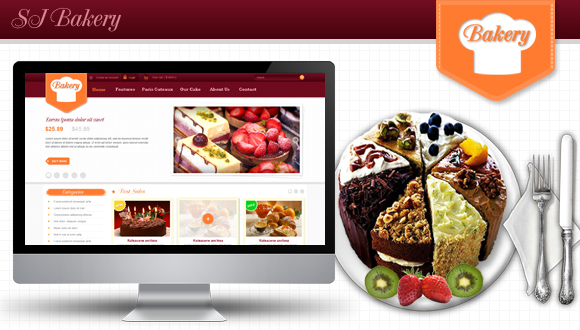
What special? Here are some more images for previewing:
Feb, 2013
Joomla 2.5.9 and 3.0.3 released
We are pleased to announce that Joomla 2.5.9 and 3.0.3 were released on Feb 4, 2013
What is new in these expected versions?

Sj Lotte - A completely new design is used specifically for the restaurant, hotel or tourism... With responsive web design layout, this restaurant Joomla template will convince any dimensions of popular display devices.